Identify any plant from a photo
Point your camera at a leaf, a flower or the whole plant. The app names it in seconds, for free, and tells you how to care for it.
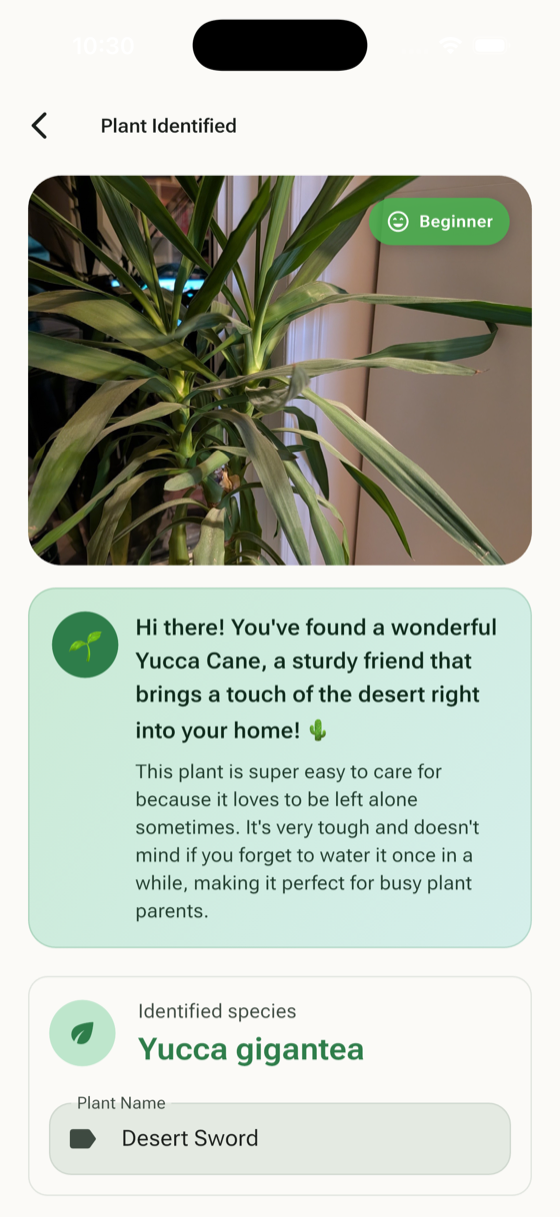
From photo to plant name in three steps
Take a photo
Photograph a leaf, a flower or the whole plant, or pick a picture from your gallery.
Get its name
The app names the species in seconds, with its common name in your language and the care basics: light, water and soil.
Keep it alive
Save the plant to your collection and the app reminds you when to water and feed it.
What it recognises
Over 10,000 plant species, from the pot on your windowsill to the tree in the park.
- Houseplants
- Garden plants
- Flowers
- Trees and shrubs
- Succulents and cacti
- Herbs and vegetables
Identify it, then keep it healthy
Knowing a plant's name is the first step. AI Plant Doctor also tells you what it needs and what to do when something goes wrong.
Care plan
Light, watering and feeding advice for that species, adjusted to the season.
Reminders
Watering and fertilising reminders, so you never have to guess.
Health check
Yellow leaves, spots or pests? A health check names the problem and gives you a step-by-step treatment plan. Health checks use your weekly free scans, then credits.
How it compares with other free identifiers
PlantNet and Google Lens are excellent free identifiers. If you only need a name, any of them will do. Here is what changes when you also want to look after the plant.
| Feature | AI Plant Doctor | PlantNet | Google Lens |
|---|---|---|---|
| Identify a plant from a photo | Yes, free | Yes, free | Yes, free |
| Care plan and watering reminders | Yes | No | No |
| Health check with a treatment plan | Yes (weekly free scans, then credits) | No | No |
Tips for an accurate result
- 1 One plant per photo, filling most of the frame.
- 2 Shoot in daylight, without flash or strong shadows.
- 3 Include a leaf and, if the plant has one, a flower.
- 4 Use a plain background so the plant stands out.
- 5 Not sure? Take a second photo from another angle.
Frequently asked questions
Is plant identification free?
Yes. Identifying a plant from a photo is free and does not use scans or credits. Health checks use your weekly free scans, then credits; Premium is unlimited.
How accurate is it?
It is very reliable for common houseplants and garden plants. Look-alike species can need a second photo of the flower or the underside of a leaf, so treat an unusual answer as a lead and confirm it with another photo.
Does it work in my language?
Yes. The app and its results are available in your language, including local plant names where they exist.
Can it tell me what's wrong with my plant?
Yes. A health check looks at the photo for pests, diseases and watering problems and gives you a treatment plan. It uses one of your weekly free scans, then credits.
Do I need an account?
No. You can start identifying plants on iPhone or Android without an account; signing in keeps your plants and reminders on all your devices.
Find out what your plant is called
Free on iPhone and Android. No account needed to start.